Using MCP to Access Health Profile Data
The Welshare health profile can be connected to AI assistants like Claude Desktop. The assistant can read health observations, list uploaded documents (coined "DocumentReferences"), and request the individual resource file contents.
The user facing MCP endpoint's tool interfaces may change. File download handling in particular is subject to known client-side limitations described below.
Quick Start
Adding the MCP Server to Claude Desktop
- Open Claude Desktop settings
- Navigate to the Connectors section
- Note the dialog info box that says
Connectors have moved to Customize. Head to the new Customize page to manage your skills and connectors.. Follow the path to the new "Customize" section - Hit the
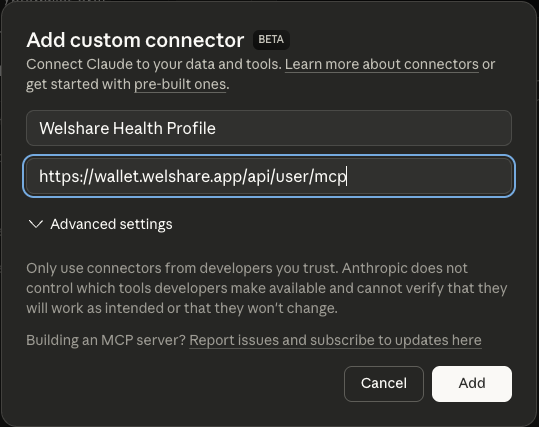
+icon button at the top of the dialog to add a custom connector. Use the following URL and an appropriate name (Welshare Health Profile):
https://wallet.welshare.app/api/user/mcp
or for test accounts:
https://staging.wallet.welshare.app/api/user/mcp
- follow the OAuth signin instructions that will open a Welshare browser window for you to signoff a profile bound JWT. That's the token that you use to authenticate against the mcp endpoints.
Available Tools
Once connected, your AI assistant has access to three tools:
my_observations
Retrieves all health observations stored in your profile. Returns FHIR Observation resources as JSON, including body weight, height, BMI, glucose, blood pressure, heart rate, and other health metrics.
Example prompt: "Show me my latest health observations"
my_document_references
Lists all uploaded files and documents with their metadata: file name, size, content type, description, and document type. Each entry includes a binaryId that can be used with my_document_content to retrieve the actual file.
Example prompt: "What documents do I have in my health profile?"
my_document_content
Retrieves the actual content of a specific file by its binaryId (obtained from my_document_references).
- Images (JPEG, PNG, etc.) are returned inline as base64-encoded image content that the AI assistant can directly view and analyze.
- Non-image files (PDFs, documents, etc.) are returned as a temporary, one-time download URL. See File Download Caveats below.
Example prompt: "Download and analyze my lab report"
File Download Caveats
One-Time Download URLs
When you request a non-image file (e.g. a PDF), the server generates a temporary download URL with an embedded access token. These URLs:
- Expire after 60 seconds
- Can only be used once (the token is consumed on first use)
- Are cryptographically random (256-bit tokens stored in Redis)
This design prevents URL sharing or replay attacks: once a URL is fetched, it cannot be used again. If the download fails or the URL expires, the agent must call my_document_content again to generate a fresh URL.
Claude Desktop web_fetch Restriction
Many MCP clients (e.g. Claude Desktop) can use a built-in web_fetch tool to download files, but they are not able to fetch from URLs returned by MCP tools. This is a deliberate security restriction in Claude's architecture, not a configuration issue. The web_fetch tool enforces URL provenance checking: it only allows URLs that were either provided directly by the user in their message or appeared in results from web_search / previous web_fetch calls. URLs originating from MCP tool responses are treated as untrusted and blocked, even if the domain is on your allowlist.
From the Claude API documentation:
"The tool cannot fetch arbitrary URLs that Claude generates or URLs from container-based server tools."
The domain allowlist in Claude Desktop settings controls which domains are accessible once a URL passes the provenance check, but does not bypass the provenance requirement itself. When the my_document_content tool returns a temporary download URL for a PDF, Claude Desktop's web_fetch will refuse to fetch it with a PERMISSIONS_ERROR.
Workaround: curl + Local Processing
Claude Desktop agents with bash/computer use access can work around this limitation by using curl to download files and then processing them locally, e.g. using a tool like pdf plumber to extract content. This works because bash tool execution operates under a different security model than web_fetch - it respects domain allowlists but does not enforce URL provenance checking.
Welshare has built an agent skill with the required instructions to guide an agent through downloading and unwrapping content locally. You can review, download and install it from the public repo's releases: https://github.com/welshare/mcp-binary-download-skill .
Impact on Other Clients
| Client | Image Files | Non-Image Files (PDFs, etc.) |
|---|---|---|
| Claude Desktop | Inline (works natively) | Requires curl workaround |
| Custom MCP clients | Inline (works natively) | Can implement custom fetch handlers |
| Claude API (direct) | Via multimodal input | Requires client-side processing |
If you are building your own MCP client, you have full control over how tool-returned URLs are handled. You can implement a fetch handler that directly downloads from temporary URLs and processes the content (e.g., PDF text extraction) before passing it to the model.
Images vs. PDFs at the model level: Images are natively understood by Claude's multimodal vision capabilities (the model processes pixel data directly). PDFs require a conversion step - text extraction or rendering to images - before the model can process them. This is true regardless of which client you use.
Video walkthrough: Setting up MCP user authentication with OAuth flow
Technical Details
Authentication
The MCP user endpoint uses self-signed JWT authentication with secp256k1 (ES256K) signatures. The JWT must be signed by the user's storage keypair and include the read scope.
Key properties of the authentication:
- The JWT
iss(issuer) field is the user's DID - Required scope:
read - No
applicationIdis needed (this is direct user access, not application access) - Token TTL is configured via
JWT_USER_OAUTH_TTL(currently 7 days)
One-Time Download Token Flow
Security Model
- File ownership: Every request verifies that the authenticated user's DID matches the file's
controller_did. Users can only access their own files. - Token isolation: One-time tokens are bound to both a specific
binaryFileIdanduserDid. A token for one file cannot be used to access another. - Token consumption: Tokens are atomically consumed using Redis
GETDEL- the read and delete happen in a single operation, preventing race conditions. - Encryption at rest: All files are encrypted with AES-256-GCM before storage. Encryption keys are stored on Nillion with secret sharing (
%allotmodifier).
Endpoint Reference
| Endpoint | Method | Purpose |
|---|---|---|
/api/user/mcp | POST | MCP Streamable HTTP transport |
/api/attachment/{binaryId}/{storageKey}?token=... | GET | One-time file download |
Related
- Authentication - Storage keys and JWT
- Binary File Uploads - Uploading and managing files
- Key Management - Key derivation and storage keys
- Agent File Download Skill - Skill file for AI agents